13. Files
A library receives paper: delivery notes, supplier invoices, scanned membership cards. The module has no business inventing an attachments table: Kewos has a Drive — versioned, attachable to any record, with its own permissions.
This step uploads a delivery note, attaches it to a catalogue title, corrects it, throws it away and gets it back.
The rule
A module never writes its own file table. It calls kewos/drive, from Python or through
the API. What that gives you, and what you will not be writing: versioning, content
addressing, a bin, sharing, expiring public links, auditing.
Two things are worth understanding before writing a line.
A document has a stable identity and immutable versions. kws_doc carries the name, the
owner, the links. Every uploaded content becomes a kws_doc_version that is never modified
again. Correcting a document means adding a version, not replacing bytes. The previous
one stays readable, and that is what makes recovery possible when somebody scanned the wrong
page.
A link is not a folder. You do not file a document into a tree: you attach it to a
record (library_title no. 1). The folders in the Drive screen are derived from those
links. No module creates a folder, and nothing is left orphaned when a record goes.
Upload, attaching it at once
curl -X POST /api/v1/drive/docs \ -H "Authorization: Bearer $TOKEN" \ -F "file=@delivery-note.pdf" \ -F "name=Delivery note 2026-09" \ -F "model=library_title" \ -F "record_id=1"{ "id": 1, "name": "Delivery note 2026-09", "content_type": "text/plain", "size": 56, "current_version_id": 1, "deleted": false, "links": [{ "model": "library_title", "record_id": "1" }]}Attaching on upload is not a writing shortcut: the server first checks that the caller may see that record. Without it, anyone could plant a document on a record they are not allowed to read.
From a module it is the same gesture in Python:
from kewos.drive import create_doc, link_doc
with engine.begin() as conn:    doc_id = create_doc(        conn,        storage,        name="Delivery note 2026-09",        content=pdf_bytes,        content_type="application/pdf",        owner_id=user_id,        now=now,    )    # The link is what makes it findable from the record, and what builds the folder.    link_doc(conn, doc_id, model="library_title", record_id="1", by=user_id, now=now)
Correcting: one more version
curl -X POST /api/v1/drive/docs/1/versions \ -H "Authorization: Bearer $TOKEN" \ -F "file=@delivery-note-corrected.pdf"[ { "number": 2, "size": 77, "content_type": "text/plain" }, { "number": 1, "size": 56, "content_type": "text/plain" }]Version 1 is still there and still readable
(GET /api/v1/drive/docs/1/versions/1/content). restore_version makes it current again,
which — again — adds a version instead of erasing one.
Discarding, and discarding for good
Two gestures, and the difference is deliberate:
curl -X POST /api/v1/drive/docs/1/trash # 200 -- reversiblecurl -X POST /api/v1/drive/docs/1/untrash # 200 -- and backcurl -X DELETE /api/v1/drive/docs/1 # 403 -- "data purger role required"The bin is a reversible state any user with write access can set. Permanent deletion
requires the kws_data_purger right, and it is audited. It is the same rule as everywhere
else in Kewos: destroying data is not a variant of editing it.
What it gives you
The document, its attachment, and the folder the record grew on its own:
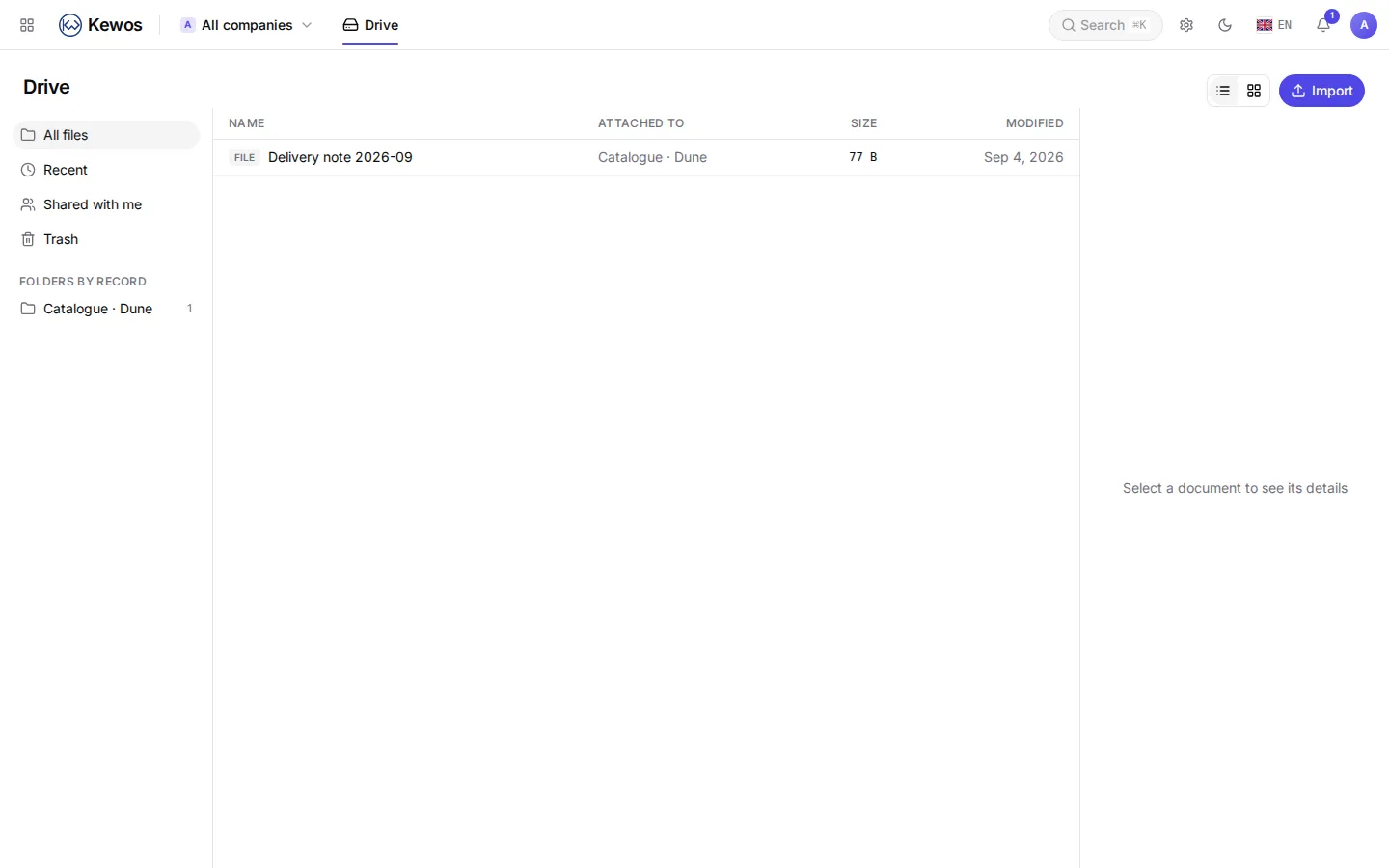
The folder reads “Catalogue · Dune”: the model’s translated label, then the title’s own
name. The server resolves both, in one query per model, because the browser holds only a
model name and an id and would need one request per folder to manage on its own. Until
yesterday this screen read library_title · 1.
You do nothing to get this: the name comes from what your model already declares, and the
translation key is the one your module already translates (model.library_title).
It chains with reading documents
This is where step 9 pays off: you upload the scanned delivery note into the Drive, then read its text.
from kewos.drive import read_currentfrom kewos.ocr import extract_text
content = read_current(conn, storage, doc_id)text = extract_text(content, content_type="application/pdf")
The document stays the evidence; the extracted text is only a reading of it. Never replace one with the other: character recognition is wrong sometimes, the original is not.
Next
The module is complete: data, screens, permissions, reports, AI, automation and files. What is left is wrapping it up for somebody else: Shipping.