4. Making it visible
At this point your module works. The tables exist, the API answers, the screens are declared.
And it is invisible.
Open the app launcher: library is not there. No error, no message, no log line. The module
works perfectly and nobody can reach it.
Why
Every installation decides which modules it switches on. This is not a code question: the registry is global to the process, so activation is a visibility filter per installation.
A module that has not been switched on appears neither in the launcher nor in the menus, and its screens answer 404 for that installation. Its tables are still there.
Switching your module on
From the interface: Settings → Modules, then switch on Library.
From the command line, while developing:
from sqlalchemy import create_enginefrom kewos.tenant_modules import set_module_active, list_module_states
engine = create_engine(DATABASE_URL)with engine.begin() as connection:    set_module_active(connection, module="library", active=True)
print(list_module_states(engine))# {'core': True, 'pipeline': True, 'support': True, 'audit': True, 'library': True}
Reload the launcher:
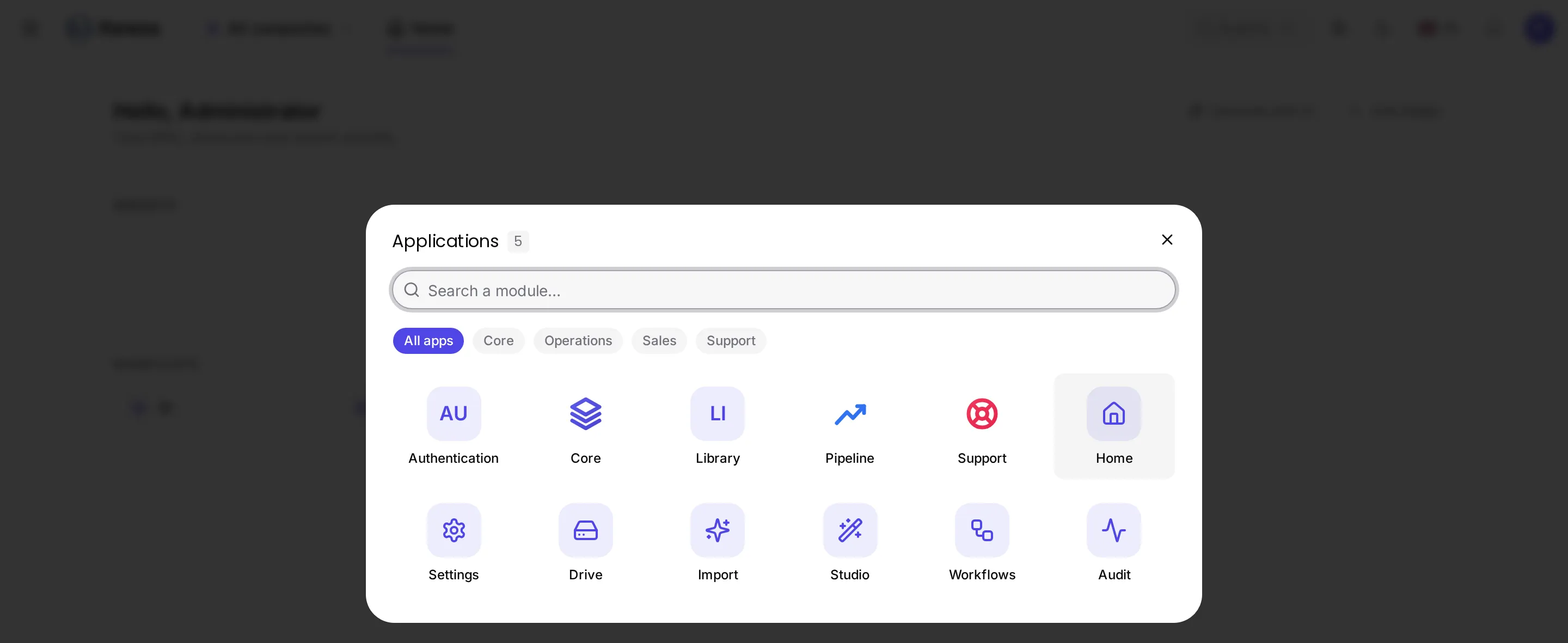
Library is there, filed in the aisle declared by category in the manifest.
The icon
In the screenshot, Library shows its initials, “LI”: that is what the launcher does when a
module has no icon.
Add icon.svg at the module’s root. A simple, monochrome path that inherits the current colour:
<svg xmlns="http://www.w3.org/2000/svg" viewBox="0 0 24 24" fill="none" stroke="currentColor" stroke-width="1.7" stroke-linecap="round" stroke-linejoin="round"> <path d="M4 5h6a2 2 0 0 1 2 2v12a2 2 0 0 0-2-2H4z M20 5h-6a2 2 0 0 0-2 2v12a2 2 0 0 1 2-2h6z"/></svg>Checking you have not forgotten anything
| Symptom | Cause |
|---|---|
| The module is not in the launcher | It is not switched on for this installation. |
| It is there but has no screen | No view declared, or views/ is not loaded by register(). |
| It is there, with screens, but they are empty | A rights question: see The rights. |
| It shows its initials | No icon.svg. |
| It is filed under “Other” | No category in the manifest. |