12. Automating
The previous step wrote a reminder in Python. It works, it is tested, and it has one flaw: changing the delay, the recipient or the wording takes a developer and a redeploy.
Kewos has a second tool for that: the flow engine, under Workflows. A trigger,
conditions, actions, wired on a canvas. No code, and the customer can open it and change it.
This step ships a flow with the module, so the automation exists from the moment it is installed instead of being rebuilt on every instance.
They are not for the same thing
This is not “one replaces the other”. The boundary is sharp and worth learning once:
| The code from step 11 | A flow | |
|---|---|---|
| What starts it | the clock (every morning) | an event: a record created, updated, deleted, or a click |
| Who can change it | a developer | the user, in the Workflows screen |
| What it can do | anything Python can do | the available blocks: condition, switch, create, update, transition, email, notification, AI agent |
| Where it runs | in the scheduled task | in the job queue, asynchronously |
A flow has no time trigger. The triggers are record.created, record.updated,
record.deleted and “manual”. Sweeping every loan each morning therefore stays the job of
the code from step 11. Reacting the moment a copy is declared lost, on the other hand, is
exactly a flow.
The file
A module ships its flows in flows/, next to views/. There is nothing to call: the kernel
reads that directory when the module loads, the way it reads onboarding.json.
modules/library/flows/lost_copy_alert.json:
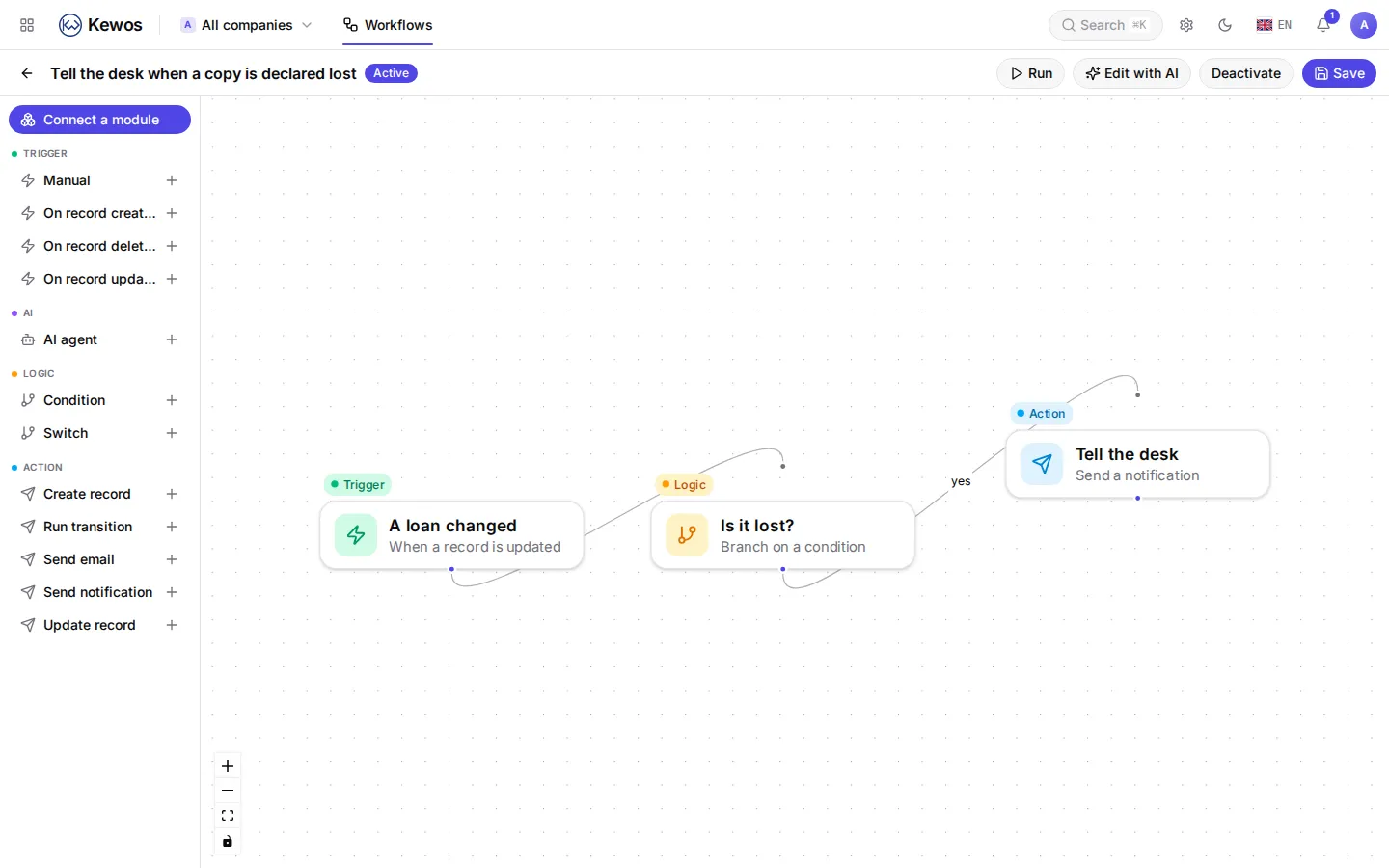
{ "ref": "library.lost_copy_alert", "module": "library", "name": "Tell the desk when a copy is declared lost", "description": "A lost copy is a decision someone has to act on.", "nodes": [ { "node_key": "loan_changed", "kind": "trigger.record_updated", "name": "A loan changed", "config": { "models": ["library_loan"] }, "pos_x": 40, "pos_y": 120 }, { "node_key": "is_it_lost", "kind": "logic.condition", "name": "Is it lost?", "config": { "expression": { "==": [{ "field": "state" }, "lost"] } }, "pos_x": 320, "pos_y": 120 }, { "node_key": "tell_the_desk", "kind": "action.send_notification", "name": "Tell the desk", "config": { "recipients": [{ "type": "group", "id": "library_librarian" }], "title": "A copy was declared lost", "body": "Loan {{ trigger.record.id }} was marked lost." }, "pos_x": 620, "pos_y": 60 } ], "edges": [ { "from_node": "loan_changed", "to_node": "is_it_lost" }, { "from_node": "is_it_lost", "to_node": "tell_the_desk", "branch": "yes" } ]}Four things are worth reading slowly.
ref. It is the flow’s identity. The kernel installs it once and never rewrites
it: after the first install the flow belongs to the customer. Rename it, change the
condition, add a branch, and an upgrade will undo none of it. That is the opposite of a
view, which is rewritten on every boot.
It arrives switched off. A shipped flow is a draft. Installing a module must never start
sending messages to anyone without a person deciding so. It is one toggle in the Workflows
screen.
The group is named by its code, not by a numeric id: library_librarian exists on every
instance, whereas id 3 means nothing anywhere else.
"branch": "yes". An edge is followed only when its label matches exactly what the
block returned. A condition returns yes or no. Writing true, which is what everybody
writes the first time, produces no error at all: the flow simply stops after the
condition. The kernel now refuses such a file when it loads, with a message naming the
branches the block really returns. That guard exists because the example on this page had
true in it too.
What it gives you
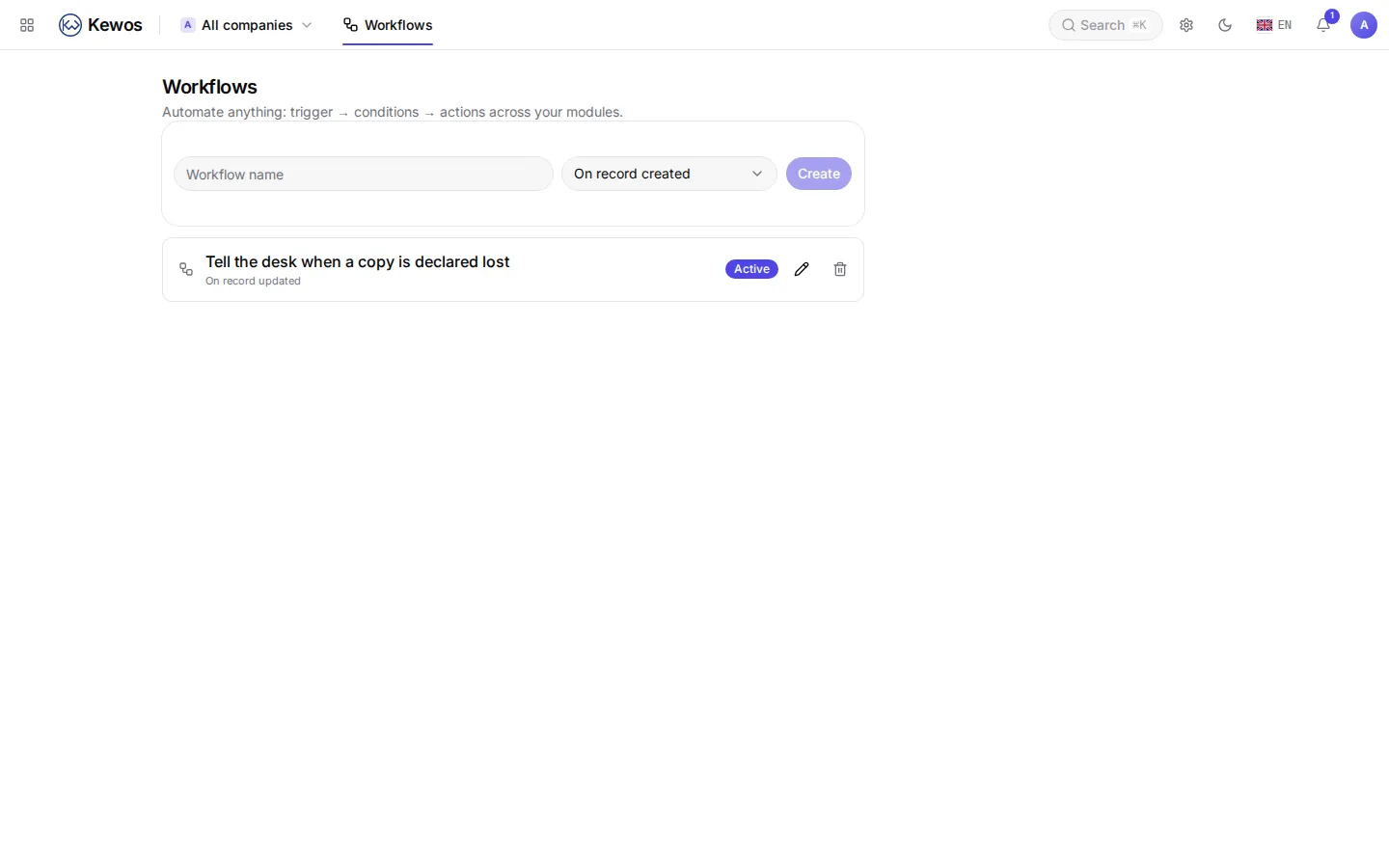
After kewos reconcile the flow is there, with nothing done in the interface:
And it opens like any hand-drawn flow. The customer can add an email, change the condition, or switch it off:
Running it for real
Declare a copy lost from the loan form (the Declare lost button from step 6). Then look:
# The run, and each step it went through.psql -c "select id, flow_id, state from kws_flow_run order by id desc limit 1"psql -c "select node_key, state from kws_flow_run_step order by id" id | flow_id | state----+---------+--------- 1 | 1 | success
node_key | state---------------+--------- is_it_lost | success tell_the_desk | successAnd the notification arrived, with {{ trigger.record.id }} resolved:
{"title": "A copy was declared lost", "body": "Loan 1 was marked lost."}The trap that says nothing
A flow does not run inside the request that triggered it. It is put on the job queue, and
the worker is what runs it. With no worker the message stays in the queue: no error, no
row in kws_flow_run, nothing in the interface. The flow looks broken when it is waiting.
Writing this page, the first run produced nothing for exactly that reason. The check is one line:
redis-cli LLEN dramatiq:default # > 0 with no worker runningkewos worker # start one, and the queue drainsWhat the customer can do next
None of the following needs a developer:
- add an
action.send_mailto the member beside the notification; - replace the condition with a switch on the state and handle
returneddifferently; - wire in an
ai.agentthat drafts the message; - switch the flow off over the summer.
That is the point of the exercise: what you ship is a starting point, not a carved rule.
Next
The module acts on its own and reacts to events. What remains is what it should do with files: Files.